- 1、解鎖 : HTC官解(必須有HTC官方帳號)

HTC手機官方解鎖全攻略教學 : http://walker-a.com/archives/2063
APK.tw 討論區 : http://apk.tw/thread-185093-1-1.html
以上2個網站已經講得很清楚喔
若不會,HTC網站是一步步教導,基本上沒什麼問題。


Google Charts API已過時,未來可能不支援

| 參數 | 描述 |
|---|---|
| CHL | 要編碼的內容。確保內容是HTML編碼的,例如%20空白 |
| CHT | 圖表類型。qrQR code。 |
| CHS | 生成的QR碼圖像的尺寸為<width>x<height>。 |

1 2 3 4 5 6 | var site = "http://data.ntpc.gov.tw/api/v1/rest/datastore/382000000A-000077-002"; var url = "https://query.yahooapis.com/v1/public/yql?q=" + encodeURIComponent('select * from json where url="' + site + '"') + "&format=json"; $.getJSON( url, function(data) { $("#result").html( JSON.stringify(data) ); }); |

1 2 3 4 5 6 | //Enable cross domain function only var site = "http://data.ntpc.gov.tw/api/v1/rest/datastore/382000000A-000077-002"; $.getJSON( site, function(data) { //html with json to string $("#result").html( JSON.stringify(data) ); }); |
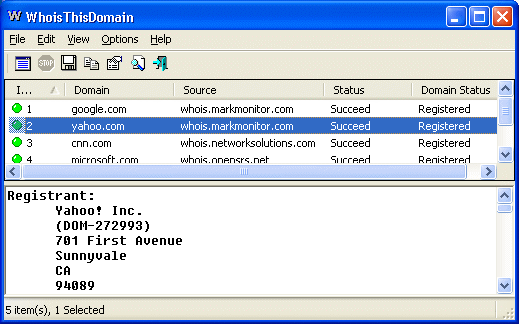

來源:https://wpbox.tips/google-fonts-chinese-traditional/網站名稱:Google Fonts : Early Access
1 2 3 | <p lang="zh-Hant">民國<span class="num">105</span >年<span class="num">4</span >月<span class="num">29</span>日</p> |
1 2 | html { writing-mode: vertical-rl; font: 24px serif } .num { text-combine-upright: all } |


<script type="text/javascript" src="http://code.jquery.com/jquery-1.7.1.min.js"></script>
<script type="text/javascript" src="turn.min.js"></script>
<div id="flipbook_IDname">
 <div class="hard"> Turn.js </div>
 <div class="hard"></div>
 <div> Page 1 </div>
 <div> Page 2 </div>
 <div> Page 3 </div>
 <div> Page 4 </div>
 <div class="hard"></div>
</div>
$("#flipbook_IDname").turn({
  width: 400,
  height: 300,
  autoCenter: true
});
長寬藉由改動width及height後的數值來設定
$("#flipbook_IDname").turn("page", 10);
//數字就是你要翻到的頁數
$("#flipbook_IDname").turn("display","single");
//single是單頁,double是雙頁也就是預設
$("#flipbook_IDname").turn("size", 1000, 750);
//第一個數字為width,第二個數字為height
//注意!!!這裡及建置步驟的width都是指雙頁式時,兩頁的寬
$(window).resize(function(){
          $("#flipbook_IDNAME").turn("size", window.innerWidth*0.5,window.innerHeight*0.8);
})
//window.innerWidth 視窗寬  window.innerHeight視窗高

1 2 3 4 5 6 7 8 9 10 11 12 13 14 | var data = [ ["", "Maserati", "Mazda", "Mercedes", "Mini", "Mitsubishi"], ["2009", 0, 2941, 4303, 354, 5814], ["2010", 5, 2905, 2867, 412, 5284], ["2011", 4, 2517, 4822, 552, 6127], ["2012", 2, 2422, 5399, 776, 4151] ]; $('#example').handsontable({ data: data, minSpareRows: 1, colHeaders: true, contextMenu: true }); |
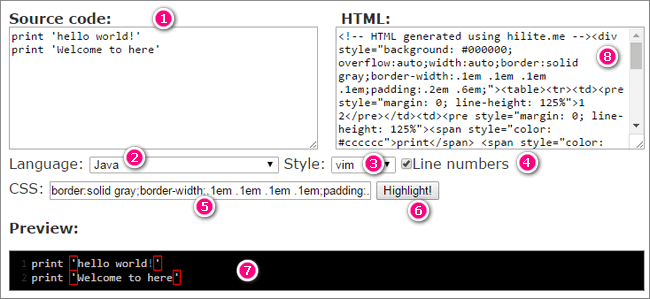
public class callMethods
{
 public static void main(String[] args) {
  methodOne();
  methodTwo();
 }

 public static void methodOne() {
  System.out.println("Hello World");
 }

 public static void methodTwo() {
  methodOne();
 }
}
#include <stdio.h>
int main()
{
 int dividend, divisor, quotient, remainder;
 dividend = 25;
 divisor = 4;
 printf("Hello, World!");
 quotient = dividend / divisor;
 remainder = dividend % divisor;
 printf("Quotient = %d\n", quotient);
 printf("Remainder = %d", remainder);
 return 0;
}
<html>
<head>
 <title>邊框樣式</title>
</head>
<body>
 <p style=border-style:none>無邊框</p>
 <p style=border-style:dotted>點線式邊框</p>
 <p style=border-style:dashed>破折線邊框</p>
 <p style=border-style:solid>直線式邊框</p>
 <p style=border-style:double>雙線式邊框</p>
 <p style=border-style:groove>槽線式(凹陷)邊框</p>
 <p style=border-style:ridge>脊線式(隆起)邊框</p>
 <p style=border-style:inset>內嵌效果的邊框</p>
 <p style=border-style:outset>突起效果的邊框</p>
</body>
</html>
注意事項:在hilite.me中所產生的代碼會使用到 pre 或者 table 的語法,因此,若你原本在CSS中就對這二個標籤做特別的處理,那麼可能就會影響到最後的呈現結果,這一點要特別注意